In today’s digital age, managing your health information efficiently is crucial. From doctor’s prescriptions to lab reports and vaccination records, keeping track of paper documents can be overwhelming. What if you could securely store all your medical data in one place and share it with healthcare providers with just a single click?
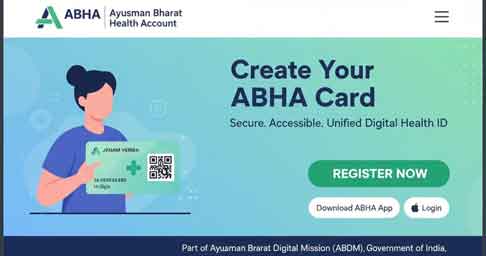
This is the vision behind the Ayushman Bharat Health Account (ABHA), an initiative by the Government of India. Your ABHA ID is a unique 14-digit number that helps you create a digital health ecosystem, allowing you to access and share your health records seamlessly across different hospitals and clinics. If you’re ready to create your ABHA ID, this guide will walk you through the registration process at https://abha.abdm.gov.in/abha/v3/register. The Ayushman Bharat Health Account (ABHA) is a digital health initiative by the Government of India, under the Ayushman Bharat Digital Mission (ABDM). It provides every Indian citizen with a unique health ID, making it easier to access health records, manage medical history, and receive healthcare services seamlessly across hospitals and clinics. Creating an ABHA account is completely free, and the digital ID can be accessed via the ABHA portal or mobile application.
Key Features of ABHA
- Unique Health ID: Every registered individual receives a personal ABHA ID.
- Digital Health Records: Store and access medical history, prescriptions, and lab reports online.
- Interoperability: Health data can be shared securely across hospitals and clinics nationwide.
- Secure & Private: Data is encrypted and can be accessed only with user consent.
- Multiple Registration Options: Register via Aadhaar, mobile number, or driving license.
- ABHA Card: Downloadable digital card for quick access to your health ID.
Step-by-Step ABHA Registration
1. Visit the Official Portal
Go to the ABHA Registration Page.
2. Choose Your Registration Method
- Aadhaar Number: Enter your Aadhaar and verify via OTP.
- Mobile Number: Register directly using your mobile number.
- Driving License / Other ID: Alternative verification using government-issued ID.
3. Enter Personal Details
Provide your name, date of birth, gender, and other requested information.
4. Create ABHA Address
Choose a unique ABHA handle (e.g., yourname@abdm) which will serve as your digital health ID.
5. Complete Verification
Verify your registration using the OTP sent to your mobile number.
6. Download Your ABHA Card
Once registered, download your ABHA card in PDF format for easy access.
Offline Registration Option
- Visit a nearby ABDM-registered healthcare facility.
- Provide identity documents (Aadhaar, etc.).
- Fill the registration form.
- Receive your ABHA number and digital health ID.
Benefits of ABHA
- Access Health Records Anytime: View and share medical history digitally.
- Nationwide Recognition: Use ABHA across hospitals and clinics in India.
- Efficient Healthcare Services: Faster consultations, fewer paperwork hassles.
- Secure & Private: Only you control who can access your health data.
Also Read
- Ayushman Card: Complete Guide to Eligibility, Benefits, Registration & Download
- PM Internship Scheme Login 2026: Easy Registration Guide
- Self Enumeration Portal 2027 – Complete Online Registration Guide
FAQ – ABHA Registration
Q1: Is ABHA registration free?
Yes, registering for an ABHA ID is completely free of cost.
Q2: Who can register for ABHA?
Any Indian citizen can create an ABHA ID using Aadhaar, mobile number, or other government-issued IDs.
Q3: Can I update my ABHA details later?
Yes, you can update personal details, contact information, and health records anytime.
Q4: How do I download my ABHA card?
After registration, you can download the digital card from the portal or ABHA app.
Internal & External Links
Internal Links:
- Link to articles like “Top Digital Health Apps in India” or “Ayushman Bharat Scheme Overview.”
External Links:
Conclusion
ABHA (Ayushman Bharat Health Account) provides digital health ID access to millions of Indians, ensuring secure, nationwide, and easy-to-manage healthcare records. Whether registering online or via the mobile app, the process is simple, secure, and free. Create your ABHA ID today to streamline your healthcare experience in India.
ABHA registration page: https://abha.abdm.gov.in/abha/v3/register.