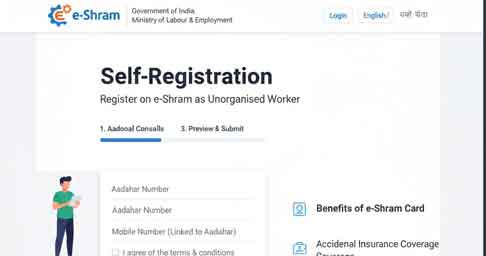
The e-Shram portal is a revolutionary initiative by the Ministry of Labour & Employment, India, designed to create a centralized database of unorganized workers. The portal helps workers access welfare schemes, social security benefits, and financial assistance. This guide explains the self-registration process for unorganized workers, enabling them to obtain their unique Shramik ID easily.
In India, millions of workers form the backbone of the economy in the unorganized sector—from construction and domestic work to street vending and agriculture. For decades, these workers have lacked formal social security benefits. The eShram Portal, launched by the Ministry of Labour and Employment, is a revolutionary step to change this. If you are an unorganized worker, registering on this portal is your key to accessing government welfare schemes, insurance, pension benefits, and more. The self-registration process at register.eshram.gov.in is designed to be simple and can be completed from your mobile phone or computer. This guide will walk you through every step.
Key Features of the e-Shram Portal
- Universal Worker Registration: Provides a unique Shramik ID to all unorganized workers.
- Access to Welfare Schemes: Enables eligibility for pensions, health insurance, and government benefits.
- Free & Online Registration: No fees; registration is simple and accessible.
- Data Security: Ensures confidentiality of worker information.
- Application Tracking: Workers can track registration status online.
Eligibility Criteria
- Age between 16 and 59 years.
- Must be an unorganized worker in India (construction, agriculture, domestic work, street vendors, etc.).
- Aadhaar card and linked mobile number are mandatory.
- Must belong to the categories recognized under the unorganized workforce guidelines.
Step-by-Step Self-Registration Process
1. Visit the Official Portal
Access the portal at: https://register.eshram.gov.in/#/user/self
2. Click on “Self Registration”
Start the registration process by selecting Self Registration.
3. Enter Aadhaar Number
- Provide your 12-digit Aadhaar number.
- Verify using OTP sent to your registered mobile number.
4. Fill Personal Details
- Full name (as per Aadhaar)
- Date of birth
- Gender
- Educational qualification
- Category (SC/ST/OBC/General)
5. Provide Contact Information
- Mobile number
- Email address (optional)
- Permanent address and current working location
6. Occupational Details
- Select occupation from the dropdown
- Type of employment (self-employed / wage worker)
- Work sector (agriculture, construction, manufacturing, etc.)
7. Bank Account & Other Details
- Enter bank account number for benefit transfers
- Upload scanned documents if required
8. Submit & Generate Shramik ID
- Verify all entered information
- Click Submit
- Receive your e-Shram card with unique Shramik ID
Benefits of e-Shram Registration
- Social Security: Access health insurance, pensions, and other welfare schemes.
- Direct Benefit Transfer: Subsidies and financial aid credited directly to bank accounts.
- Recognition: Official recognition for unorganized workers.
- Future Programs: Eligibility for upcoming government welfare programs.
Important Tips
- Keep your Aadhaar and bank details ready before registration.
- Ensure mobile number is linked to Aadhaar for OTP verification.
- Enter all information accurately to avoid rejection.
- Download and save your e-Shram card for future reference.
Internal Link Suggestions
- Link to your e-Shram related guides or NRK registration articles.
- Example anchor text: “Check the e-Shram eligibility criteria” linking to your eligibility page.
External Link Suggestions
Conclusion
The e-Shram portal self-registration process is straightforward, free, and essential for unorganized workers across India. By completing self-registration, workers receive a unique Shramik ID that helps them access welfare benefits and social security schemes efficiently. Register today to secure your benefits and ensure your participation in government welfare programs.
Access the portal at: https://register.eshram.gov.in/#/user/self