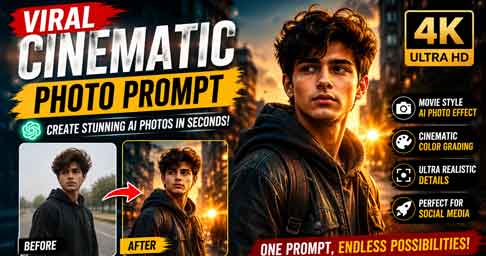
The demand for cinematic photo editing has increased rapidly in recent years. Social media platforms such as Instagram, Facebook, and YouTube Shorts have made cinematic portraits one of the most popular visual trends. Many creators now search for a Viral Cinematic Photo Prompt that can transform ordinary images into stunning movie-style portraits. AI technology has made this process easier than ever before, allowing users to create professional-looking photos without expensive cameras or editing software.
A cinematic photo usually features dramatic lighting, realistic colors, shallow depth of field, detailed facial features, and a professional movie-inspired atmosphere. These effects create a premium visual appearance that attracts more engagement on social media. With the right AI prompt, anyone can generate a high-quality cinematic portrait within seconds.
What Is a Viral Cinematic Photo Prompt?
A Viral Cinematic Photo Prompt is a specially crafted instruction that tells an AI image generator how to create a movie-style image. Instead of editing manually in software like Photoshop, users can simply upload a photo and enter a detailed prompt. The AI then analyzes the prompt and produces a visually appealing cinematic result.
These prompts often include details such as camera settings, lighting effects, lens blur, color grading, atmosphere, background elements, and image quality requirements. When combined correctly, these instructions help generate realistic and professional cinematic photographs that look like scenes from a blockbuster movie.
Best Viral Cinematic Photo Prompt 👇
Enhance the image to ultra-high definition with maximum clarity and realistic detail. Remove blur, noise, grain, color fading, and compression artifacts while preserving the subject's exact identity, proportions, and natural appearance. Restore sharp focus with refined micro-details in skin, hair strands, fabric texture, and background surfaces. Maintain authentic skin texture with natural pores and tonal variation, avoiding over-smoothing, artificial sharpening halos, or plastic effects. Correct color balance to restore natural skin tones and accurate hues while preserving the original mood. Improve exposure, dynamic range, and contrast subtly to add depth and realism without altering the lighting direction. Retain the original framing, composition, camera angle, posture, facial expression, background elements, and overall atmosphere.Hard rule: Do not modify facial structure, facial features, expression, hairstyle, body shape, pose, clothing, age, or identity in any way.Why Cinematic Photos Go Viral
Cinematic photos attract attention because they create an emotional connection with viewers. Strong lighting, dramatic depth, and realistic details make images look professional and memorable. People naturally spend more time viewing visually appealing content, which increases engagement rates on social media platforms.
Instagram creators, influencers, photographers, and digital marketers frequently use cinematic editing techniques to improve content performance. Since cinematic visuals stand out in crowded feeds, they often receive more likes, comments, shares, and saves. This increased engagement helps content reach larger audiences and improve visibility.
How to Create Cinematic Photos Using AI
Creating cinematic photos with AI is a simple process. First, choose a high-quality portrait image with good lighting. Next, upload the image to an AI image generation platform. After uploading, paste a detailed Viral Cinematic Photo Prompt into the prompt field. Then generate the image and review the results.
If needed, modify the prompt slightly to match your preferred style. Some users prefer darker movie-inspired tones, while others like bright Hollywood-style color grading. Experimenting with different lighting and atmosphere descriptions can help achieve unique results. Most AI tools allow multiple generations, making it easy to find the perfect cinematic look.
Best AI Tools for Cinematic Photo Creation
Several AI platforms can generate cinematic photos from prompts. Popular options include ChatGPT image generation, Microsoft Designer, Leonardo AI, and other advanced AI art tools. These platforms use modern machine-learning models to create realistic images with impressive details.
For beginners, user-friendly tools are often the best choice because they provide simple interfaces and fast image generation. Advanced users may prefer professional AI platforms that offer greater control over image styles, lighting, and composition settings.
Tips for Better Cinematic Results
To achieve the best cinematic effect, start with a clear portrait image. Avoid blurry photos because AI systems perform better when facial details are visible. Use prompts that specify lighting conditions, camera lens effects, and realistic color grading. Including terms such as “4K quality,” “DSLR photography,” and “movie-style atmosphere” often improves output quality.
Consistency is also important. If you create content for social media, use similar cinematic styles across multiple posts. This creates a recognizable visual identity and helps build a stronger personal or professional brand online.
Web Version
- Gemini : gemini.google.com/app
- ChatGPT: https://chatgpt.com
Final Thoughts
The Viral Cinematic Photo Prompt trend continues to grow because it allows anyone to create professional movie-style portraits without advanced editing skills. AI technology has simplified photo enhancement and made cinematic photography accessible to everyone. Whether you are a content creator, influencer, student, photographer, or social media enthusiast, cinematic AI prompts can dramatically improve your visual content.
By using a high-quality Viral Cinematic Photo Prompt and selecting the right AI tool, you can transform ordinary images into stunning cinematic masterpieces. As AI image generation continues to evolve, cinematic photography will remain one of the most popular and effective visual styles for online content creation.