Old photographs hold powerful memories, but time slowly damages them with cracks, fading, dust, and stains. Thankfully, modern technology makes restoration easier than ever. With the right AI photo prompt for restoring old photo, you can transform damaged images into crystal-clear HD portraits within minutes. Today, AI tools use deep learning to repair scratches, enhance faces, sharpen blurry areas, and even restore original colors naturally.
In this detailed guide, you will learn how to write the perfect AI prompt, which tools to use, and where to download reliable apps for web, Android, and iPhone. If you want professional-quality results without expensive software, this guide will help you step by step. Let’s begin restoring your precious memories the smart way.
What Is an AI Photo Prompt for Restoring Old Photo?
An AI photo prompt for restoring old photo is a detailed instruction you give to an AI image tool. The prompt tells the AI exactly what to fix, enhance, and preserve in the image. When you write a clear and specific prompt, the AI understands how to remove scratches, correct lighting, improve sharpness, and maintain the original facial structure.
Instead of manually editing every detail, AI analyzes the photo and automatically fills missing areas with realistic textures. Moreover, it improves skin tones naturally and balances contrast for studio-quality results. Therefore, writing the right prompt plays a major role in achieving high-quality restoration. If your prompt is vague, the result may look artificial. However, when you include instructions like “keep original facial structure” and “natural skin texture,” the output becomes realistic and professional. That is why prompt writing is the secret key to perfect restoration.
Step-by-Step Guide to Restore Old Photos Using AI
First, scan or upload your old photo in the highest possible resolution. A clear base image helps the AI detect details more accurately. Next, open your preferred AI image restoration tool and paste the AI photo prompt for restoring old photo mentioned above.
After that, review the preview result carefully. If the image looks overly smooth, adjust the prompt by adding “retain natural texture.” On the other hand, if colors appear dull, include “enhance vibrant but realistic tones.” Small prompt adjustments can dramatically improve final results. Finally, download the restored image in HD or 4K resolution. Always save both the original and restored versions for safety. This simple process ensures professional-quality restoration without advanced editing skills.
Tips to Get Professional Results
To get the best outcome from your AI photo prompt for restoring old photo, always use high-resolution scans. Low-quality images limit AI performance. Moreover, avoid over-processing because too much enhancement can make the photo look artificial.
You should also zoom into facial areas to check details carefully. If the face looks altered, refine your prompt with “preserve original identity.” Furthermore, use soft lighting correction rather than heavy contrast boosts. Balanced editing keeps the image realistic and vintage-friendly. Finally, store restored images in both JPEG and PNG formats. This ensures compatibility across devices and social media platforms.
Why AI Photo Restoration Is Better Than Manual Editing
Traditional photo editing requires technical skills and expensive software. However, AI simplifies the entire process through automation and deep learning analysis. It detects cracks, dust, and fading instantly. Then, it reconstructs missing details using intelligent algorithms.
Because AI understands facial structures and textures, it maintains natural proportions while enhancing clarity. In addition, it saves time and reduces manual effort significantly. Therefore, AI restoration has become the preferred method for photographers, content creators, and families preserving memories. With the right AI photo prompt for restoring old photo, anyone can achieve studio-quality results within minutes.
Best AI Photo Prompt for Restoring Old Photo (Copy & Use)
Below is a professional and SEO-optimized AI photo prompt for restoring old photo that you can copy and use in most AI tools:
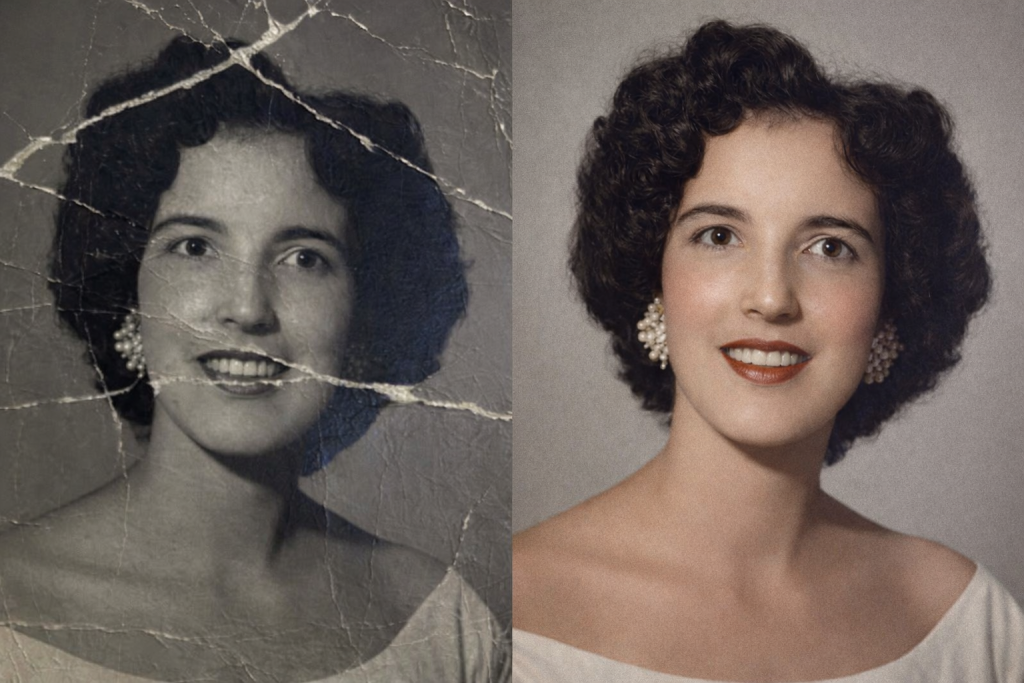
- Open ChatGPT/Gemini
- Upload a photo that you have to restore
- Copy and Enter this prompt:
Prompt 1:
Restore this old damaged album photo into a clean HD portrait. Remove all scratches, cracks, dust marks, stains and noise. Fix faded colors, improve sharpness, enhance face details naturally, correct lighting and contrast, and keep the original facial structure exactly the same. Make it look like a newly taken studio photo while maintaining a realistic vintage Kerala boy appearance. Output in ultra HD quality (4K), smooth skin texture, natural colors, and clear background.Prompt 2:
Restore this old photo into a modern, professional, high-clarity image. Remove all scratches, dust, cracks, and stains. Enhance the sharpness and facial details without changing the person's identity. Colorize it with natural, realistic tones and adjust the lighting for a clean, professional looThis prompt works effectively because it clearly explains every required improvement. It focuses on restoration while protecting identity and realism. As a result, AI produces a balanced and high-resolution image without over-editing.
How to Restore Old Images with
- 🔗 Official Website: https://chat.openai.com
- 🔗 Official Website: https://gemini.google.com
Final Thoughts
Old photos tell stories that deserve preservation. Instead of letting them fade away, you can restore them using advanced AI tools and a properly structured prompt. By following this guide and using the recommended AI photo prompt for restoring old photo, you will achieve realistic, high-quality restoration results. Start today, upload your vintage photos, and bring memories back to life in stunning HD clarity.