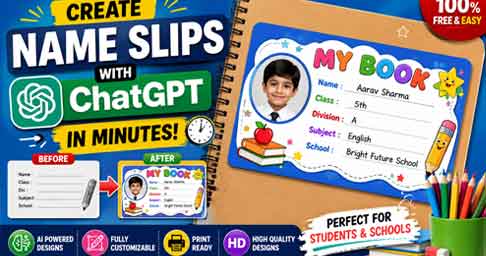
Creating a professional Name Slip Design Online has become easier than ever. Students, teachers, parents, and school administrators can now use artificial intelligence tools to design attractive and personalized name slips within minutes. ChatGPT has transformed the way people create school-related designs by providing instant ideas, layouts, prompts, and creative concepts. Instead of spending hours learning complex design software, users can now generate customized name slip designs with simple instructions.
This modern approach saves time, improves creativity, and delivers professional-looking results suitable for notebooks, textbooks, school files, and educational materials. With the right tools and prompts, anyone can create high-quality name slips without advanced design skills.
What Is a Name Slip Design?
A name slip design is a label attached to books, notebooks, files, folders, and school materials. It contains important details such as the student’s name, class, division, subject, school name, and sometimes a photograph. Schools use name slips to identify ownership and maintain organization among students. Modern name slip designs include colorful graphics, cartoon elements, educational themes, and personalized layouts.
Digital tools now allow users to create attractive name slips that are both functional and visually appealing. As schools increasingly adopt creative learning environments, customized name slip designs have become popular among students and parents.
Why Use ChatGPT for Name Slip Design?
ChatGPT helps users generate unique design ideas, creative layouts, attractive color combinations, and professional prompts for image generation tools. Instead of starting from scratch, users can describe their requirements and receive instant design suggestions. For example, a parent can upload a student’s photo and request a colorful school-themed name slip with educational graphics.
ChatGPT can generate detailed design instructions that can be used in image creation platforms. This process reduces design time and helps users achieve professional results. Additionally, ChatGPT provides endless customization options for different age groups, school brands, and educational themes.
Step-by-Step Guide to Create a Name Slip Using ChatGPT
The process of creating a name slip using ChatGPT is simple and beginner-friendly. First, collect the required information such as the student’s name, class, division, subject, and school name. Next, upload the student’s photo if you want a personalized design. Then provide a clear prompt describing the desired style, colors, themes, and elements. ChatGPT can generate a complete design description based on your instructions.
After receiving the prompt, use an AI image generator or design platform to create the final design. Review the output, make adjustments if necessary, and download the high-resolution version for printing. This method produces professional-quality results suitable for educational use.
Best Prompt for Creating a School Name Slip
Using a detailed prompt improves the final design quality. Here is an example: “Create a colorful HD school name slip design featuring a smiling student photo. Include fields for Student Name, Class, Division, Subject, and School Name. Use educational elements such as books, pencils, stars, and school icons.
Maintain a clean layout with bright colors suitable for children. Keep the student’s face unchanged and ensure the design is print-ready.” This type of prompt helps AI tools understand exactly what you need and produces more accurate results. Detailed prompts generally lead to better customization and improved visual appeal.
Free Tools for Name Slip Design Online
Several free tools can help you create professional name slips. ChatGPT assists with design ideas and prompts, while graphic design platforms provide editing features and templates. These tools allow users to add text, photos, backgrounds, and decorative elements without requiring advanced design knowledge.
Most platforms support high-resolution exports suitable for printing. Beginners can quickly learn these tools and create attractive designs for school use. Combining AI-generated ideas with user-friendly design software offers the best results.
Tips for Creating Attractive Name Slip Designs
Always choose bright and readable colors that match the student’s age group. Use clear fonts that remain legible after printing. Include sufficient spacing between text fields to maintain a clean appearance. Educational icons such as books, pencils, rulers, and stars enhance the visual appeal of school-related designs. If using a student photograph, ensure the image is high quality and properly cropped. Avoid cluttering the design with excessive decorations. A balanced layout improves readability and creates a professional look. Testing the design before printing helps identify any formatting issues and ensures optimal results.
Benefits of AI-Powered Name Slip Design
AI-powered design tools save significant time compared to traditional graphic design methods. Users receive instant suggestions, creative layouts, and personalized concepts without extensive manual work. These tools encourage creativity while maintaining professional standards. Schools, parents, and students benefit from faster design creation and easier customization. AI technology also makes professional design accessible to people without graphic design experience. As artificial intelligence continues to evolve, creating customized educational materials will become even more efficient and user-friendly.
Prompt for making a name slip
NAME :
Std: ........... _ Div: .......
Roll No: ...............................Subject........................
School:
Using this information, a name slip should be made for the child in this photo to be pasted into the school book. It should have a fun, interactive design that is suitable for children. It should be made in the actual size of the name slip.
Design a colorful and attractive school name slip for kids. Include a circular student photo frame on the left, cute cartoon characters, pencils, books, stars, and rainbow elements. Use bright blue, yellow, and red colors. Add fields for Student Name, Class, Division, Subject, and School Name. Professional print-ready design, HD quality, 3.5 x 2 inches, clean layout, vibrant and child-friendlyCreate a modern school book name slip with a student photo. Decorate with school supplies like pencils, crayons, rulers, notebooks, and school bags. Use a cheerful color palette matching the student's photo colors. Include editable fields: Name, Class, Division, Subject, and School Name. Cute, creative, high-resolution printable design.Design a fun space-themed school name slip for children. Include rockets, planets, stars, astronauts, and galaxy backgrounds. Add a photo frame for the student's picture. Bright and attractive colors with easy-to-read text sections for Name, Class, Division, Subject, and School Name. Premium HD print-ready design.Create an adorable school name slip featuring friendly animals like giraffe, elephant, lion, rabbit, and birds. Include a student photo frame and colorful nature elements. Add fields for Student Name, Class, Division, Subject, and School Name. Fun, engaging, child-friendly, and high-quality printable design.Design a premium school name slip with a superhero-inspired theme for young students. Include dynamic comic-style elements, stars, lightning effects, books, and learning icons. Add a large photo frame and sections for Name, Class, Division, Subject, and School Name. Eye-catching, modern, colorful, HD quality, suitable for printing on school notebooks.Useful Links
ChatGPT Web:
ChatGPT
ChatGPT Android App:
ChatGPT Android App
ChatGPT iPhone App:
ChatGPT iOS App
Canva Design Platform:
Canva
Conclusion
The popularity of Name Slip Design Online continues to grow as AI tools simplify the design process. ChatGPT provides an innovative solution for generating creative concepts, design prompts, and personalized layouts for students and schools. By combining ChatGPT with modern design platforms, anyone can create professional, attractive, and printable name slips in just a few minutes. Whether you need a simple notebook label or a fully customized school book sticker, AI-powered tools make the process faster, easier, and more creative than ever before.