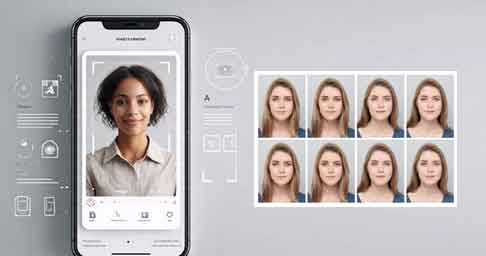
The Cutout Pro Passport Photo Maker Application is one of the most trusted and widely used tools for creating passport-size photos, visa pictures, ID photos, and government document images in just a few seconds. Designed using advanced AI technology, the app automatically detects faces, adjusts backgrounds, maintains accurate dimensions, and applies biometric rules for various countries. This level of precision makes it extremely useful for students, professionals, travelers, and anyone who needs instant high-quality ID photos without visiting a studio.
What makes the Cutout Pro Passport Photo Maker unique is its ability to produce studio-quality passport photos at home using only a smartphone or PC. The app saves time, reduces the cost of repeated photo sessions, and ensures that every image meets strict government regulations. Whether you need a photo for an Indian passport, a US visa, a Canadian PR form, or a student ID card, this application handles it effortlessly. The platform is accessible via web browser, iPhone, and Android devices, making it convenient for users across different regions. Its clean interface and easy instructions allow even beginners to edit photos confidently. In this article, we explore its features, benefits, and complete usage guide.
🖼️ What Is Cutout Pro Passport Photo Maker?
Cutout Pro Passport Photo Maker is an online and mobile application powered by artificial intelligence. The app automatically removes backgrounds, corrects lighting, and adjusts image sizes based on official standards of each country. This ensures that photos are ready for passport submissions, visa applications, and official documents.
The app also includes pre-set templates for more than 50+ countries worldwide. Each template follows exact specifications such as height, width, DPI, head ratios, and background color. Many traditional photo editing apps require manual adjustments, but Cutout Pro simplifies the entire process into one click.
Additionally, the app offers face enhancement, blemish removal, shadow correction, and color improvement to make your photos look clean, professional, and compliant with biometric rules. These advanced features are usually found in expensive editing software, but Cutout Pro provides them at a much more accessible level.
With support for both mobile devices and desktops, the service ensures flexibility for users who prefer editing on the go or working with larger images on a computer screen.
🔧 Key Features of Cutout Pro Passport Photo Maker Application
The Cutout Pro Passport Photo Maker Application includes a wide range of smart and helpful features. Its AI-powered system automatically processes images, saving time and ensuring accuracy. Unlike manual editing applications, this tool intelligently detects facial structure, posture, and lighting conditions for a perfect output.
One of its major features is automatic background removal. Instead of visiting a studio to get a clean white background, the app replaces any background with a government-approved white or light color. This alone saves significant effort and ensures the photo meets passport standards.
Another impressive feature is the auto-size adjustment. For each country, the app sets the correct passport dimensions like 35×45 mm, 2×2 inches, or other required sizes. Users simply upload a normal photo, and the app transforms it into a perfect passport image within seconds.
Additional features include face centering, brightness correction, sharpness enhancement, digital beautification, red-eye removal, and error detection. These tools help users avoid rejection due to improper lighting or alignment.
📸 How to Create Passport Photos Using Cutout Pro
Using the Cutout Pro Passport Photo Maker is extremely simple, even for users who have no experience with editing tools. The system is designed with a user-first approach to ensure smooth and fast usage.
To begin, users only need to upload a clear photo captured from their smartphone or camera. The platform analyzes the image, identifies the face area, and adjusts the background instantly. Next, users can choose their country or document type from the available presets to format the photo automatically.
Once the image is processed, users can preview it and make optional adjustments like brightness, head tilt correction, or cropping. After confirming the final version, the download button provides a high-resolution image suitable for online submission or printing.
This entire process takes less than one minute, making it one of the fastest passport photo solutions available online. The application eliminates the need to visit studios, ensuring flexibility and saving both time and money.
🎯 Why Choose Cutout Pro Passport Photo Maker?
There are several reasons behind the growing popularity of the Cutout Pro Passport Photo Maker Application. First, it provides consistent accuracy, which is essential for government documents. Rejected passport photos can delay applications significantly, so a reliable app is crucial.
Second, the application is cost-effective. Instead of paying for multiple physical photocopies, users can generate unlimited digital versions and print them only when needed. This makes it ideal for frequent travelers, job applicants, or students who require ID photos regularly.
Third, Cutout Pro ensures privacy and security through encrypted uploads. Users do not need to worry about photos being stored or misused. The system automatically deletes images after processing. This makes it a safe option for handling sensitive passport-size images.
Lastly, the app’s cross-platform design means users can access it from any device—making it fully flexible for personal and professional use.
📲 Download Links (iPhone, Android & Web)
You can access the Cutout Pro Passport Photo Maker using the following links:
📱 Android App (Google Play Store):
👉 https://play.google.com/store/apps/details?id=ai.cutout.pro
📱 iPhone App (Apple App Store):
👉 https://apps.apple.com/app/cutout-pro-ai-photo-editor/id6448784847
🌐 Passport Photo Maker:
👉 https://apps.apple.com/app/cutout-pro-ai-photo-editor/id6448784847
📝 Conclusion
The Cutout Pro Passport Photo Maker Application is a powerful and reliable tool for generating perfect ID and passport photos from the comfort of your home. Its AI-based automation, accurate templates, background correction, and easy-to-use interface make it one of the best solutions for everyone—from international travelers to job applicants and students. With support for Android, iPhone, and web browsers, the platform offers maximum flexibility and convenience.