Creating fun and expressive portraits has never been easier. Today, anyone can create a caricature AI image using simple online tools without graphic design skills. Artificial intelligence now transforms normal photos into exaggerated cartoon-style artwork in seconds. Whether you want a social media profile picture, a gift design, or creative branding artwork, AI caricature tools make the process smooth and fast. In this guide, you will learn how AI caricature generators work, the best tools to use, how to download your image, and tips to get professional results. Everything is explained clearly for beginners. Let’s get started.
What Does It Mean to Create a Caricature AI Image?
When you create a caricature AI image, you use artificial intelligence to exaggerate facial features while keeping the person recognizable. Traditional caricatures were drawn by artists who emphasized big eyes, wide smiles, or unique facial expressions. Now AI software analyzes your face and recreates it digitally with artistic exaggeration. This technology works using machine learning models trained on thousands of artistic examples.
As a result, the system understands how to stylize faces in different cartoon formats. For example, you can choose comic style, 3D animation, watercolor caricature, or even Pixar-inspired themes. Moreover, the process usually takes less than one minute. Because AI tools automate the artistic process, users save time and money. Instead of hiring an illustrator, you can generate multiple versions instantly. That is why AI caricature creation is trending worldwide.
Why AI Caricature Generators Are So Popular
AI caricature tools have gained massive popularity for several reasons. First, they are extremely easy to use. You simply upload a clear photo, select a style, and click generate. Within seconds, the AI produces a creative caricature image. Second, these tools are affordable and often free. Many websites offer basic downloads at no cost, while premium options provide high-resolution files. Therefore, students, marketers, and content creators all benefit from this technology.
Third, AI caricatures are highly shareable. People use them for Instagram profile pictures, YouTube thumbnails, gaming avatars, wedding invitations, and even business branding. Since digital content dominates modern communication, having a unique visual identity matters more than ever. Finally, AI tools constantly improve. Each update produces more realistic details and better artistic balance. Consequently, the results now look professional rather than robotic.
Best Use Cases for AI Caricature Images
AI caricatures are more than just fun edits. They serve many professional and creative purposes. For example, digital marketers use caricatures for branding. A unique illustrated face stands out more than a regular photo. Similarly, YouTubers and streamers use cartoon avatars for channel identity. Since caricatures look friendly and artistic, they attract more clicks.
Additionally, caricatures make memorable gifts. You can print them on mugs, T-shirts, posters, or birthday cards. Wedding couples also use AI caricature portraits for invitations and reception decorations. Moreover, small businesses use them for website mascots. A playful caricature humanizes a brand and builds emotional connection. Therefore, AI caricature images are practical in both personal and commercial settings.
Tips for Getting Professional Results
To achieve the best output when you create a caricature AI image, follow these expert tips. First, always use bright and well-lit photos. Natural daylight produces better detail recognition. Second, avoid sunglasses or heavy filters that hide facial structure. Clear visibility helps AI detect proportions correctly.
Next, test multiple styles before finalizing your design. Sometimes a 3D cartoon style looks better than a sketch filter. Also, adjust contrast and brightness after download if necessary. Basic editing can enhance final quality significantly. Finally, choose high-resolution downloads for printing. Social media images can use standard quality, but posters or merchandise require HD versions.
Step-by-Step Guide to Create a Caricature AI Image
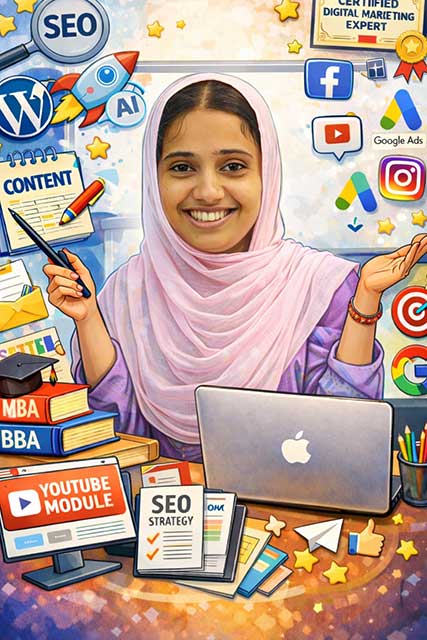
- Open ChatGPT
- Upload a clear photo of yourself
- Coppy and Enter this prompt:
Create a caricature of me and my job based on everything you know about meIf necessary, you can add more information such as art style, work, background, etc. After the image is submitted, you can request changes again.
How to Create a Caricature AI Image with
- 🔗 Official Website: https://chat.openai.com
- 🔗 Official Website: https://gemini.google.com
Also Read
- Viral Cinematic Photo Prompt: Create Stunning AI Movie-Style Photos
- Free Name Slip Design Online: How to Create a Professional Name Slip.
- Bakrid Mubarak Photo Frame – Create Beautiful Eid Festival Memories Online
Final Thoughts
Learning how to create a caricature AI image opens new creative possibilities. With modern AI tools, you can transform any ordinary photo into colorful digital art within seconds. The process is simple, affordable, and beginner-friendly.Whether you want social media branding, creative gifts, or business marketing visuals, AI caricature generators deliver fast and impressive results. Start experimenting today and explore different styles to find your perfect look.